Multi-company
QuickBooks Complete supports connecting multiple QuickBooks companies within a single monday.com workspace. This capability is useful for both accounting firms and operating firms that, for whatever reason, have multiple QuickBooks companies jointly operated and managed.
Management overview
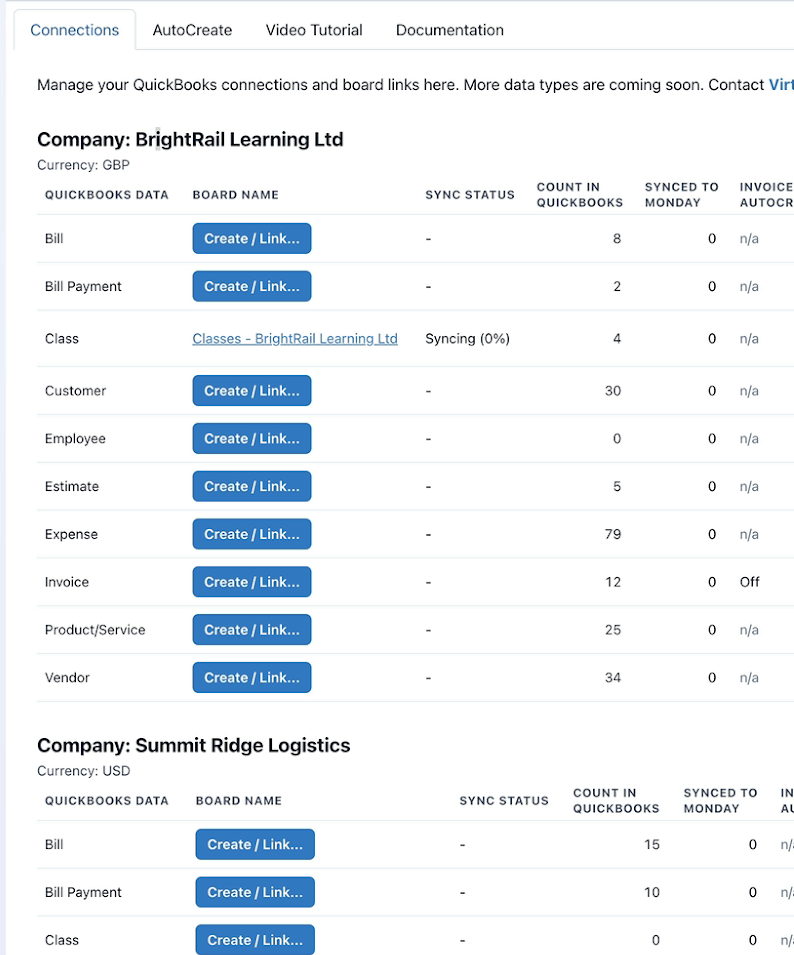
Each connected company’s data is grouped and labeled in the control panel:
Connect additional companies
- Click Connect to QuickBooks at the bottom of the Connections dashboard.
- Authenticate and select another company.
- Repeat board-linking for each required data type.
If you connect a company that is already connected, it will remain so without causing any harm.
Board naming
When you use Create / Relink, the app suggests board names that include the company name being linked.
For example, if you link four data types each for three QuickBooks companies, you would end up with 12 boards (4 x 3).
Once data is synced into monday, you can rename the boards, and move them around, use monday features to tally and analyze data across multiple boards, set up cross-board relationships in monday, etc.